
Google Sheets has built-in functions for pulling web data: IMPORTXML, IMPORTHTML and IMPORTDATA. They're great for a static HTML table. On most modern sites they return an empty cell, #N/A, or "Imported content is empty", because they fetch the raw HTML and never run JavaScript. They also make you write XPath, one formula per field.
There are two PulpMiner routes into Sheets, depending on how you work:
- The Web Data AI Extract add-on. You point it at a column of URLs, describe the columns you want, and AI fills the sheet. There are no formulas and no API key, and it runs from a sidebar inside Google Sheets.
- A PulpMiner JSON API plus Apps Script. This suits a page you want to refresh on a schedule, or anywhere you want the same endpoint in other tools too.
Option 1: the Google Sheets add-on (no formulas)
The Web Data AI Extract add-on by PulpMiner is available on the Google Workspace Marketplace. You sign in with Google, and no API key is needed.
How it works:
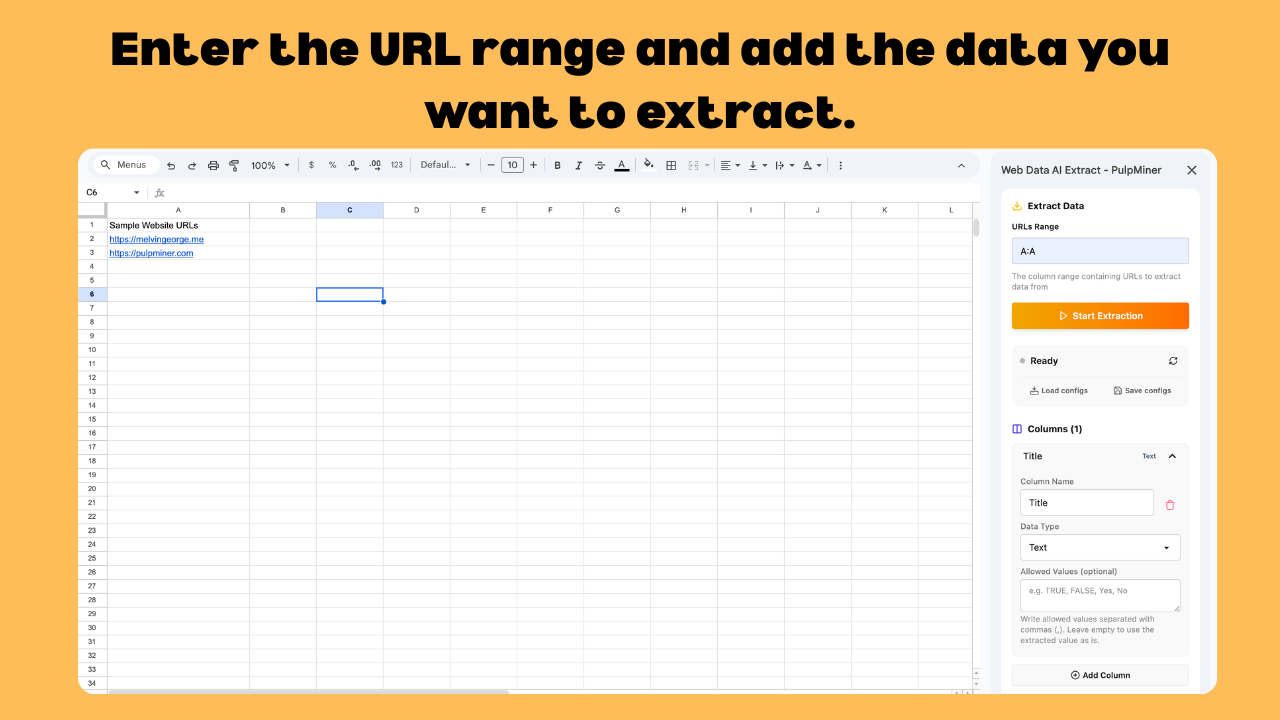
- Open the add-on from Extensions in Google Sheets. A sidebar opens on the right.
- Paste the website URLs you want data from into a column.
- Enter the URL range (for example
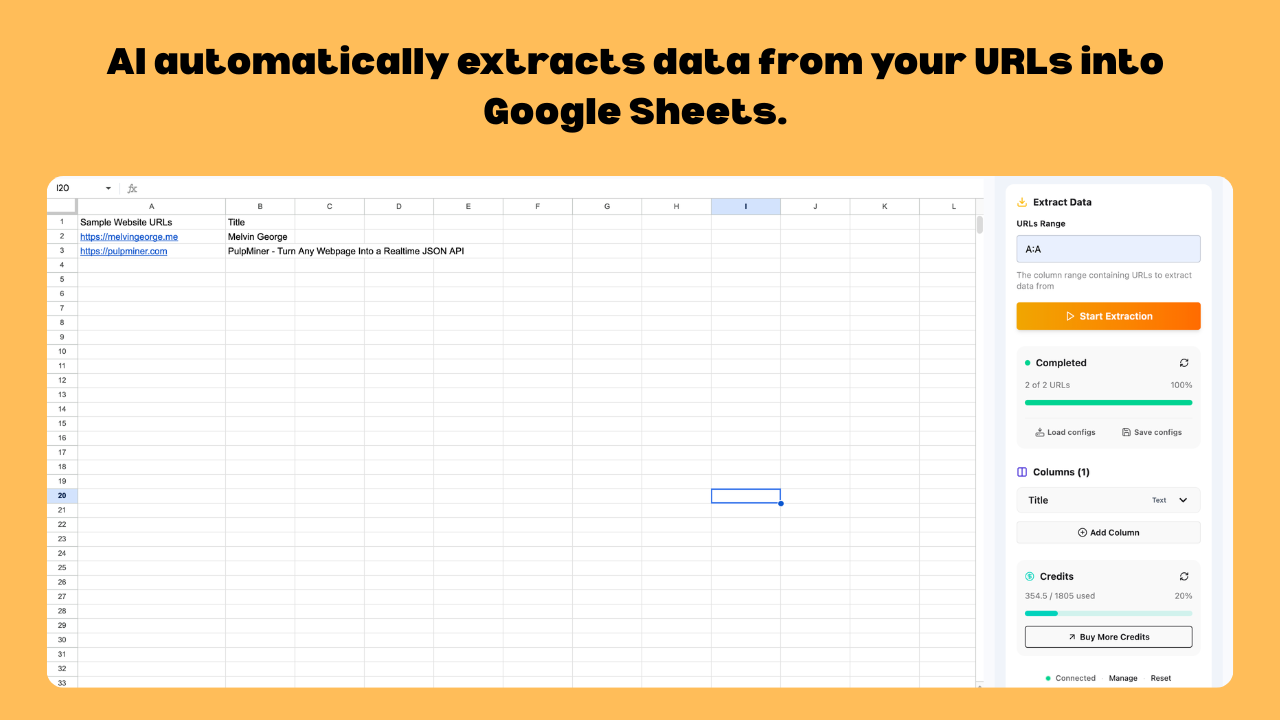
A:A) and define each column you want. Give it a name, a data type, and optional allowed values to keep the output consistent. - Click Start Extraction. The add-on processes each URL and writes the results into your sheet.
- Save the configuration so next time you can reload it and run the same extraction again.
Good for:
- turning a list of product URLs into a comparison sheet (name, price, rating, availability)
- enriching a list of company websites (company name, industry, contact details)
- building a content tracker (title, author, publish date)
- comparing property listings side by side (price, location, bedrooms, status)
Option 2: a JSON API you call from Apps Script
If you need one page refreshed on a schedule, such as a results table or a single listing page, create a PulpMiner API for it, then call it from Apps Script on a time-driven trigger.
First, test the endpoint:
curl -H "apikey: YOUR_API_KEY" \
  https://api.pulpminer.com/external/3141
{
"data": {
"items": [
{ "name": "Course A", "price": 49, "startDate": "2026-11-02" },
{ "name": "Course B", "price": 99, "startDate": "2026-11-16" }
]
},
"errors": null
}Then pull it into a sheet with Apps Script (Extensions → Apps Script):
function refreshFromPulpMiner() {
  const res = UrlFetchApp.fetch('https://api.pulpminer.com/external/3141', {
    headers: { apikey: PropertiesService.getScriptProperties().getProperty('PULPMINER_API_KEY') },
    muteHttpExceptions: true
  });
  const body = JSON.parse(res.getContentText());
  if (body.errors) throw new Error(JSON.stringify(body.errors));
  const rows = body.data.items.map(i => [i.name, i.price, i.startDate]);
  const sheet = SpreadsheetApp.getActive().getSheetByName('Data');
  sheet.getRange(2, 1, rows.length, 3).setValues(rows);
}
Store the key in Script Properties rather than in the code, then add a time-driven trigger to run refreshFromPulpMiner on your schedule. Because the API returns the page's data in your schema, the script doesn't parse any HTML.
IMPORTXML vs the PulpMiner add-on vs the PulpMiner API
| IMPORTXML / IMPORTHTML | Web Data AI Extract add-on | PulpMiner API + Apps Script | |
|---|---|---|---|
| JavaScript-rendered pages | No | Designed for messy, dynamic pages | Yes, with JS rendering on |
| Setup | XPath per field | Describe columns in a sidebar | Build the API once, then a short script |
| Many URLs at once | One formula per URL | A whole column of URLs per run | One call per page (or URL variables) |
| Cost | Free | Pay-as-you-go credits | Pay-as-you-go credits |
If IMPORTXML works for your page, keep using it. It's free. Switch when the page is dynamic, when you need many fields, or when formulas keep breaking.
Pricing
Both routes use the same pay-as-you-go credits. There's no subscription and credits never expire. Packs start at $30 for 600 credits. The add-on page lists 600 credits as about 1,500 extractions. On the API route, a call is 0.4 credits (0.5 with JS rendering), and generating a schema is 0.25 (0.35). New PulpMiner accounts get 5 free credits, no card needed.
FAQ
Why does IMPORTXML return empty or #N/A?
Usually because the data is added to the page by JavaScript after it loads. IMPORTXML only sees the initial HTML. Check "view source": if the value isn't there, no IMPORTXML formula will find it.
Do I need an API key for the add-on?
No. You sign in with Google inside the add-on. The API route (Option 2) uses your PulpMiner API key in an apikey header.
Can I extract from hundreds of URLs?
Yes. The add-on is built for bulk runs over a column of URLs. Each extraction uses credits, so check the cost before a big run.
Will the data refresh automatically?
The add-on runs when you start an extraction, and saved configs make re-runs quick. For scheduled refreshes, use Option 2 with an Apps Script time-driven trigger.
Does it work on pages that need a login?
No. Both routes are for public pages.